Employee Timesheets That Build Themselves

The Modge desktop agent records every session as it happens. Sessions roll into the right pay period. Employees submit. Managers approve a whole pay period in one click. The pay period locks. The payroll export is ready. No spreadsheets. No chasing.

vector

Free 14-day trial

vector

No credit card required

vector

One-click pay-period approval

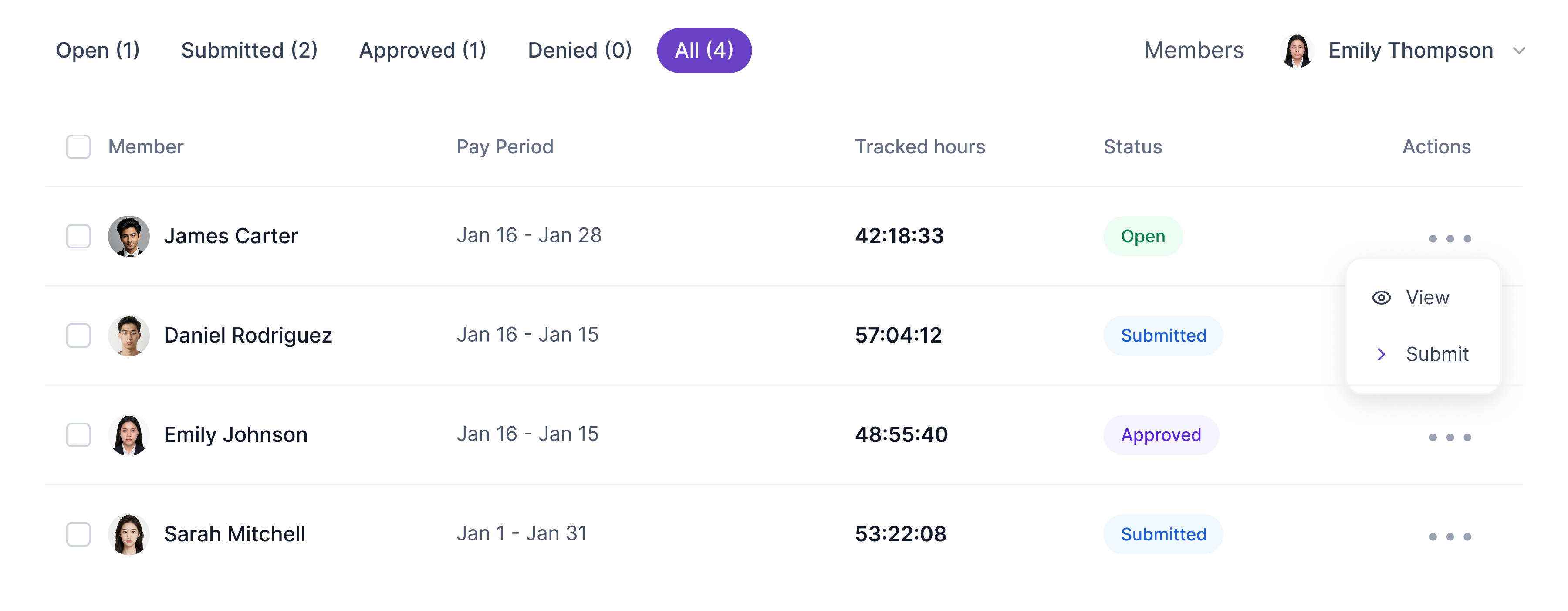
Dashboard showing member time tracking with columns for member name, pay period, tracked hours, status, and actions, highlighting Emily Thompson logged 42:18:33 hours with status Open.
Five circular portraits of diverse professionals arranged in a horizontal row with white borders.
Trusted by 1,800+ remote & on-site teams
0
Hours Tracked
0
Timesheets Approved
0
Employees Managed
0%
Uptime
THE TIMESHEET DASHBOARD

One dashboard for every timesheet workflow.

The three views that cover the whole pay-period cycle.
Timesheet editing interface showing total tracked time 36h 15, productivity score 95%, and amount owed $108.78 with detailed daily project hours and earnings from March 15 to March 21, 2026.

Review and edit before submitting.

The employee view. Auto-populated sessions, with the option to add or correct entries by hand. Every manual edit is logged for the audit trail.

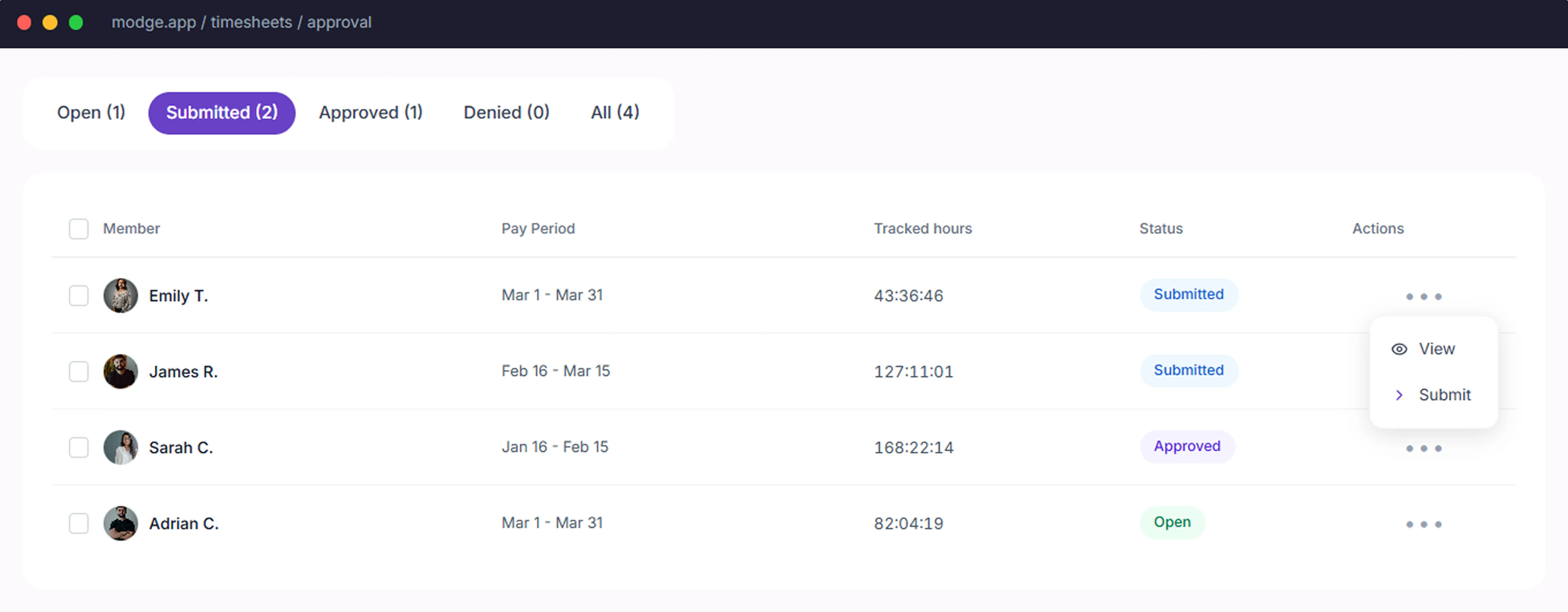
Timesheet approval interface showing four entries with member names, pay periods, tracked hours, and statuses: two submitted, one approved, and one open, with action options visible for one entry.

Approve the whole pay period in one click.

A timeline of every shift today, with the assigned person on each row and live status overlaid. See who started on time, who hasn't clocked in yet, and who's running long, in one scroll.

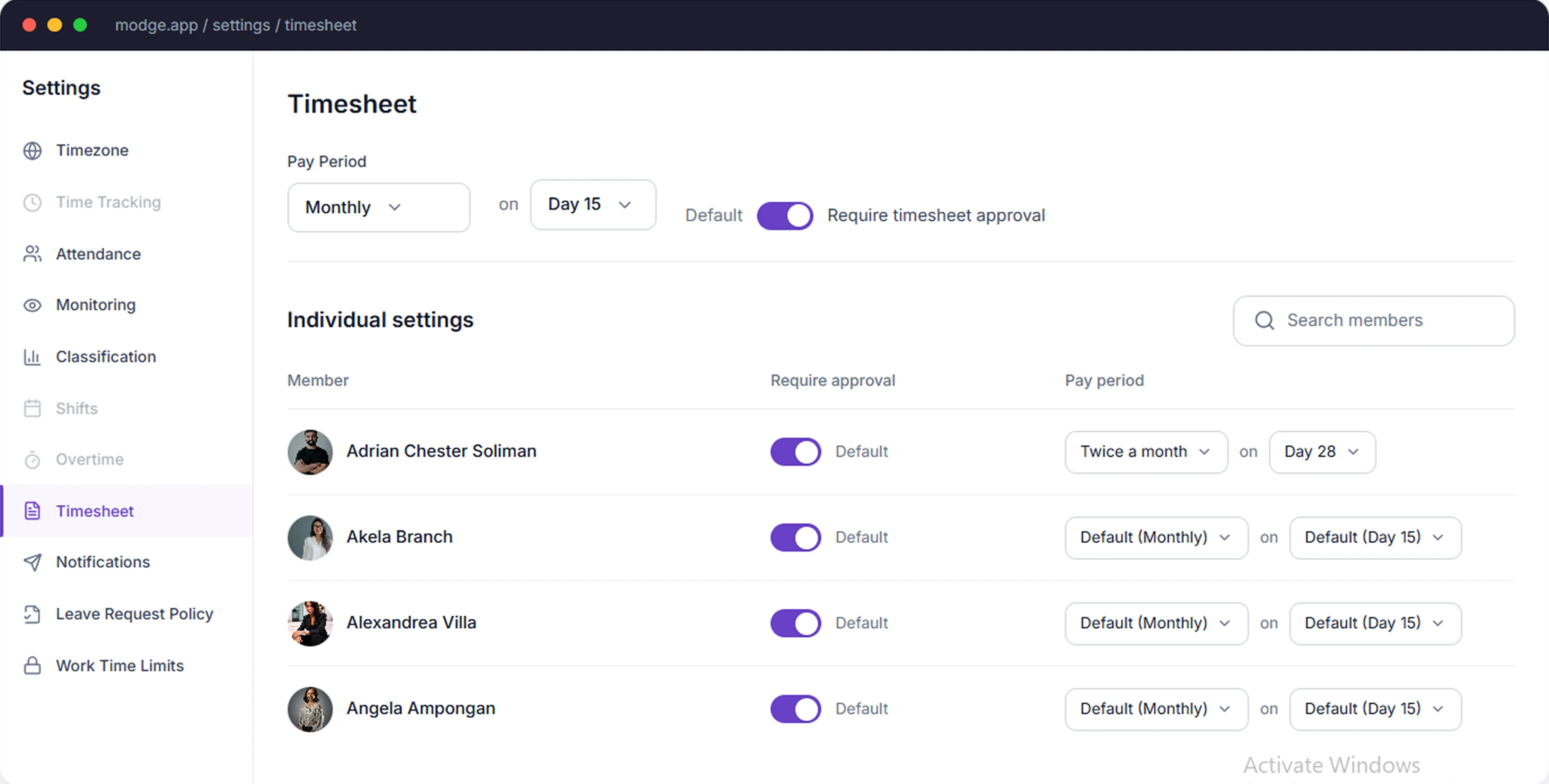
Timesheet settings page showing pay period options with toggles for requiring timesheet approval, and individual settings for members including Adrian Chester Soliman, Akela Branch, Alexandrea Villa, and Angela Ampongan.

Configure once. Reuse forever.

Set pay-period frequency (weekly or biweekly), grace windows, manual-edit reason requirements, and notification rules. Configure once and the rest of the cycle runs itself.

 HOW THE TIMESHEET BUILDS ITSELF

Your desktop agent builds your timesheet.

Tracked sessions populate the right pay period automatically. The employee reviews. The manager approves.

Sessions captured by the desktop agent populate the timesheet automatically

Each entry tagged with project, billable status, and date

Idle time excluded so totals reflect actual work

No daily logging form, no end-of-week reconstruction from memory

Start Free Trial
image
image
APPROVAL WORKFLOW

One click. Whole pay period. Done.

The approval cycle that takes finance teams from "Friday afternoon scramble" to "lunchtime sign-off."

list-icon
Submit, approve, or kick back individual entries with a comment
list-icon
Approve a whole pay period in one click once everything's signed off
list-icon
Pay period locks once approved so the numbers don't drift
list-icon
Reopen a locked period only with audit-logged admin override
list-icon
Notifications fire to the right manager when a timesheet is submitted
See It in Action
THE TIMESHEET CYCLE

How Modge timesheets actually work.

Three steps. One pay period. From the first session to the approved hours.
1

Sessions become entries

Every tracked session becomes a timesheet entry, tagged with the project and billable status. Sample entry: Mar 19 - Roadmap planning - 6h 39m.
list-icon
Download & Install Agent
2 min · any OS
list-icon
Auto-created entry
  • Date
    Mar 19, 2026
  • Project
    RCW
  • Duration
    6h 39m
list-icon
Mar 19, 2026
+ Add Time
Every session auto-populates your timesheet.
2

Employee submits the pay period

At the end of the pay period, the employee reviews and submits. Sample: Pay Period - 127:11:01 hrs - $108.78 billable subtotal.
Mar 1 – Mar 31, 2026
  • Total hours
    127:11:01
  • Amount owed
    $108.78
list-icon
 Submit Pay Period
list-icon
Pay rates lock at submission — amounts are final.
3

Manager approves in one click

The pay period lands in the approval pipeline. The manager approves the whole period in one click, denies individual entries with a comment, and signs off. Pay period locks.
    Open
    2
    timesheets
      Submitted
      3
      timesheets
        Approved
        5
        timesheets
        • list-icon
          James Rivera
          Submitted
        • Mar 1 – Mar 31
          127:11:01
        • ApproveDeny
        PAY RATES

        Payroll-ready amounts calculated from locked rates.

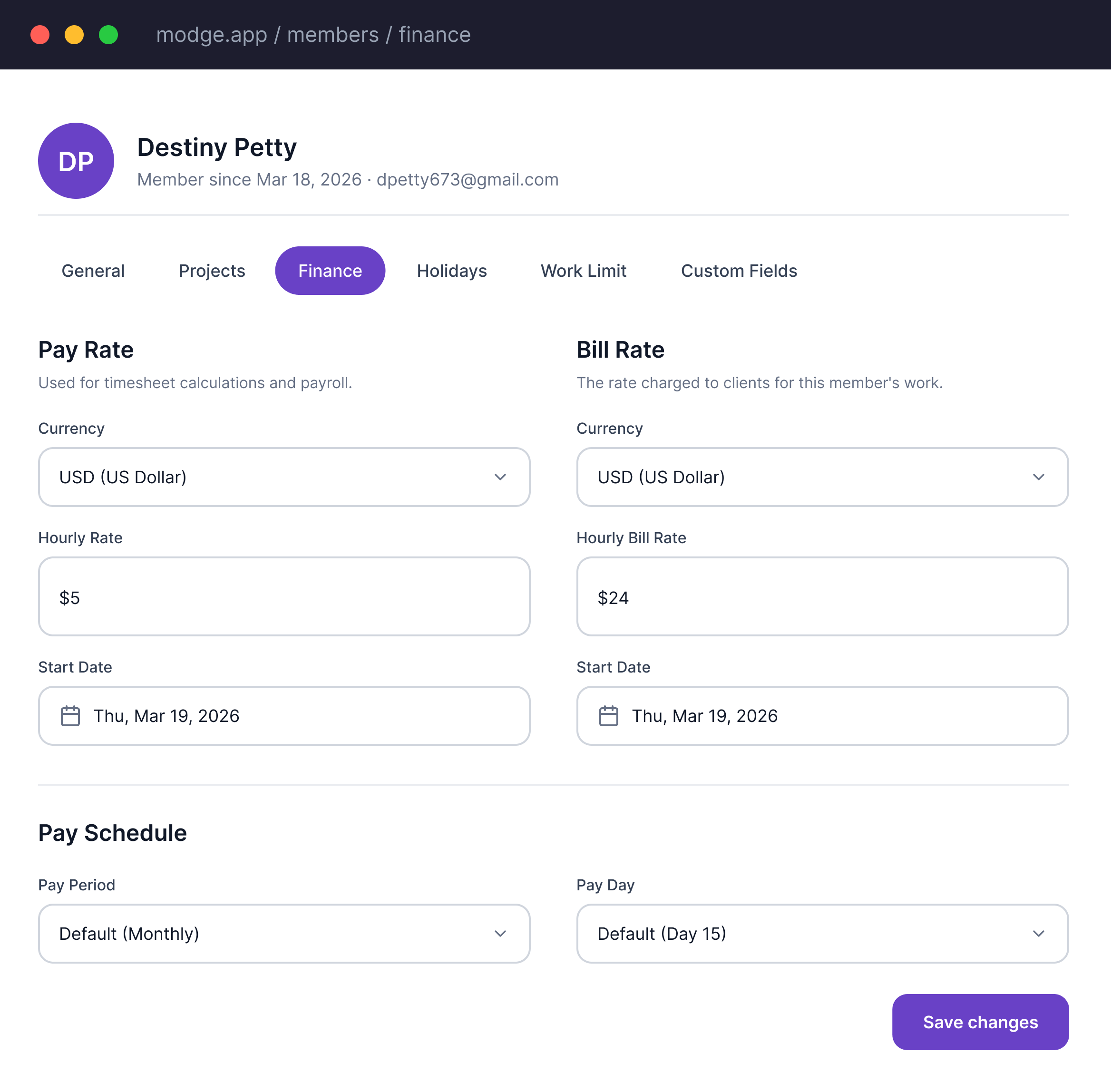
        Set hourly pay rates and bill rates per member with currency and start date. Configure pay periods globally (Weekly, Semi-monthly, Monthly) or override per member. When a timesheet is submitted, rates lock — ensuring payroll amounts are final regardless of future rate changes.

        list-icon
        Bill rates set per member, per project, or per client
        list-icon
        Pay rates set per member with effective-from dates so historical entries don't recalculate retroactively
        list-icon
        Billable amounts calculated automatically - no spreadsheet formulas
        list-icon
        Locked rates apply to approved entries so finance can trust the number
        list-icon
        Rate changes are audit-logged with who, when, and what changed
        Start Free Trial
        image
        image
        LEAVE INTEGRATION

        Sick days & paid leave appear in timesheets.

        When paid leave is approved, Modge automatically creates a timesheet entry within the corresponding pay period. The Leave Time stat card shows exactly how many hours came from leave vs. tracked work — no manual reconciliation needed.

        list-icon
        Approved paid leave inserts hours into the matching timesheet automatically
        list-icon
        Leave hours visible in the pay-period total alongside tracked sessions
        list-icon
        Adherence and payroll both reflect approved leave with no double entry
        list-icon
        Custom leave policies - sick, vacation, personal, jury duty, more
        list-icon
        Leave balance shown to the employee in the timesheet view
        Explore Leave Management
        MANUAL ENTRIES

        Manual entries with a full audit trail.

        Forgot to start the tracker? Attended an in-person meeting? Add manual time entries with project, start/end time, and an optional note. Manual entries are clearly flagged in the "Manually added" column — and every addition, edit, and deletion is logged in the Manual Time Edits report with who, when, and why.

        list-icon
        Add or edit time by hand when you forgot to start the agent
        list-icon
        Every manual change is logged with who edited it, when, and the reason given
        list-icon
        Audit log is immutable - even an admin can't rewrite history
        list-icon
        Reason codes configurable per organization for compliance use cases
        list-icon
        Manual entries flagged in the report so finance can spot patterns
        Start Free Trial
        imageimage
        CORE FEATURES

        Everything timesheets should do

        Activity Timeline

        One click to start, one click to stop. The agent runs in the background and logs every app, URL, and session without anyone having to remember.

        App & URL Tracking

        Find the tools your team actually relies on, ranked by hours and grouped by productivity classification, before usage patterns show up in delivery delays.

        Idle Detection

        Long pauses for thinking shouldn't kill a productivity score. Configurable idle thresholds tell deep focus from real inactivity, so the totals stay honest.

        Smart Timesheets & Approvals

         Daily and weekly views, in-line edits, and one-click approvals. Friday afternoons get an hour of their life back.

        Time Off, Holidays & Breaks

        Custom leave policies, PTO accrual, and approval flows that land straight in the right timesheet. No spreadsheet handoff at the end of the month.

        Budgets, Rates & Alerts

        Set per-project budgets and bill rates, then watch project profitability update as the team logs time, so overruns get spotted before the invoice goes out.

        Offline Support

        Network blips don't drop work. Events buffer locally on the device and sync the moment the agent reconnects.

        Roles & Permissions

        Owner, admin, manager, employee, viewer. Each role sees only the projects, teams, and data their job actually needs.

        Exports & Automation

        Export CSV or PDF for any date range, person, team, or project. Hand finance and clients clean reports without anyone touching a spreadsheet.

        BUILT FOR EVERY ROLE

        Tailored timesheets for every role.

        From employees to HR, everyone gets the timesheet workflow they need.

        Managers & team leads

        Approve a whole pay period in one click. See entries that need attention. Kick back what shouldn't be approved with a comment.
        list-icon
        One-click pay-period approval
        list-icon
        Flagged entries surfaced first
        list-icon
        Kick-back with comment

        HR & payroll

        Approved hours, paid leave, overtime, and the audit log - all on one source of truth, exportable in three CSV formats plus PDF.
        list-icon
        Hours, leave, and overtime
        list-icon
        CSV plus PDF exports
        list-icon
        Full audit trail

        Employees & contractors

        Review your auto-populated timesheet, edit only the entries that need correcting, submit in seconds. Your leave balance and bill rate live in the same view.
        list-icon
        Auto-populated timesheet
        list-icon
        Edit only exceptions
        list-icon
        Leave balance in view
        IMPACT

        The impact of acting on insight.

        5h+

        Manager time saved per week on timesheet chasing

        100%

        Pay periods now approved on schedule

        2x

        Faster pay-period close cycle

        12x

        Fewer "did you submit your timesheet?" Slack DMs

        FREQUENTLY ASKED

        Ten things teams ask before turning timesheets on.

        How do timesheets actually populate?

        The desktop agent records every session - start, end, project, billable status. Sessions roll into the matching pay-period timesheet automatically. The employee reviews and submits. The manager approves.

        What pay-period frequencies does Modge support?

        Weekly and biweekly. Both are configurable per organization. Custom pay-period structures (semi-monthly, monthly) are on the roadmap.

        Can my team add time manually?

        Yes. Manual entries are supported and tracked separately from automatic sessions. Every manual change is logged with the editor's name, the timestamp, the field that changed, and the reason given. The audit log is immutable.

        What happens when an entry is denied?

        Denied entries kick back to the employee with the manager's comment attached. The employee fixes the entry and resubmits. Nothing disappears into a Slack thread - every back-and-forth is part of the audit log, creating complete transparency without micromanagement.

        Does paid leave appear in the timesheet automatically?

        Yes. When a paid leave request is approved, the hours insert into the matching timesheet and pay period automatically. The employee sees the leave entries alongside their tracked sessions. Adherence and payroll both reflect the approved leave with no double entry.

        How does Modge handle bill rates and pay rates?

        Bill rates are set per member, per project, or per client. Pay rates are set per member with effective-from dates so historical entries don't recalculate retroactively. Both feed into the approved-pay-period exports

        Can a pay period be reopened after it's approved?

        Yes, but only with an audit-logged admin override. The default is for approved pay periods to lock so the numbers don't drift. The reopen action and the reason are logged.

         What payroll exports does Modge support?

        CSV in three formats - generic, Wise, and PayPal - plus a printable PDF. Pay periods reconcile against approved hours, paid leave, and the bill rate rules you've set.

        Are timesheets available offline?

        The desktop agent continues capturing time while offline. Sessions sync to the timesheet the next time the agent has internet - no data loss, no missed entries.

        Can multiple managers approve timesheets for the same person?

        Yes. Modge supports multi-manager assignments. Permissions are role-scoped so each manager sees only the team members they oversee. Approval routing follows the assignment.

        Employee Timesheet Software

        Stop chasing timesheets. Start approving them.

        Free for 14 days. Full feature access. Two-minute install on macOS or Windows. Most teams approve their first Modge pay period within the first week.

        image