
star-image

4.8 (9,847 Reviews)

Time Tracking Without the Busywork.

Install the Modge desktop agent in two minutes. From there, every session is captured automatically, classified by project, and rolled into a timesheet your team submits in seconds and you approve in one click. No timer to remember. No clock-in screen to forget.

A horizontal row of five circular profile photos featuring diverse people smiling or posing against light backgrounds.
Trusted by 1,800+ remote & on-site teams
imageimageimage

We’ve been featured in

image
 BENEFITS

Why teams switch to automatic time tracking.

Four things automatic tracking takes off your plate.

Stop chasing timesheets — Every session is logged the moment it happens and rolls straight into the timesheet. By the time the week ends, the data is already there waiting for review, not waiting to be reconstructed.

Bill clients with proof — Tracked hours, app usage, and (optionally) screenshots stand behind every invoice. Disputes go from "trust us" to "here's the audit trail.

Approve a pay period in one click —Tracked sessions roll into a weekly or biweekly timesheet, ready for the employee to submit and the manager to approve in seconds

Pay people, accurately, on time — Pay periods reconcile against approved hours, paid leave, and the bill rate rules you've set per member or project. Payroll exports follow.

Timesheets

Timesheets that build themselves.

Every tracked session becomes an entry. Every entry rolls into the right pay period. Nothing gets typed twice.

Auto-populated from tracked sessions, ready to review

Submit, approve, or kick back with a comment in one screen

Pay periods lock once approved so the numbers don't drift

image
Timesheets

 From install to approved timesheet in three steps.

1

Install once

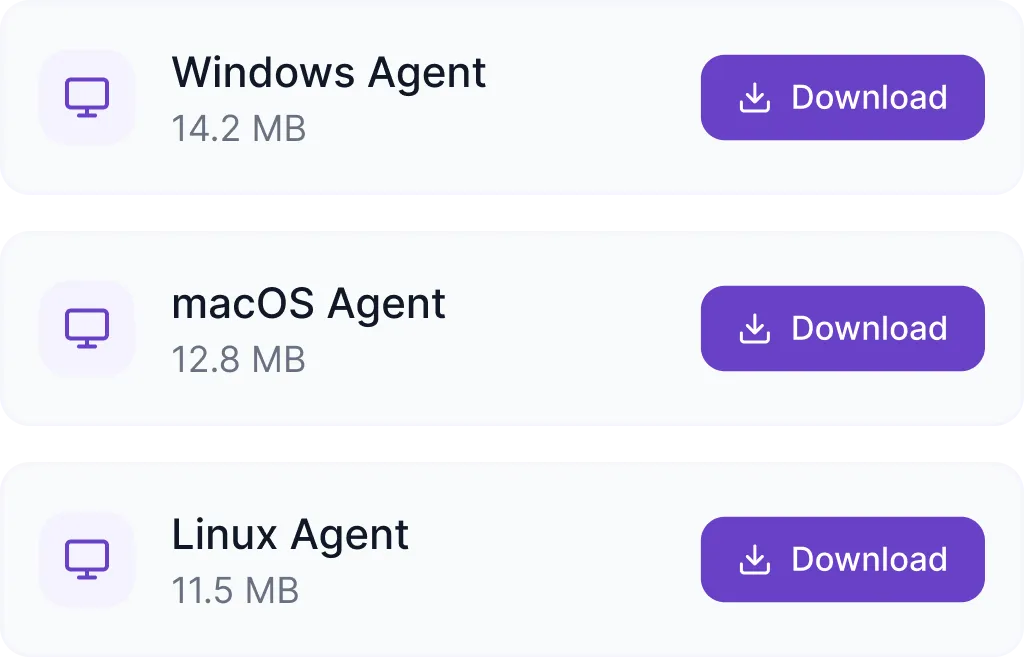
Send your team a download link. The desktop agent installs in about two minutes on macOS or Windows. From the first session onward, time tracks itself.
Download options for Windows Agent 14.2 MB, macOS Agent 12.8 MB, and Linux Agent 11.5 MB with purple download buttons.
Installs in under 2 minutes. No admin rights needed.
2

Time tracks automatically

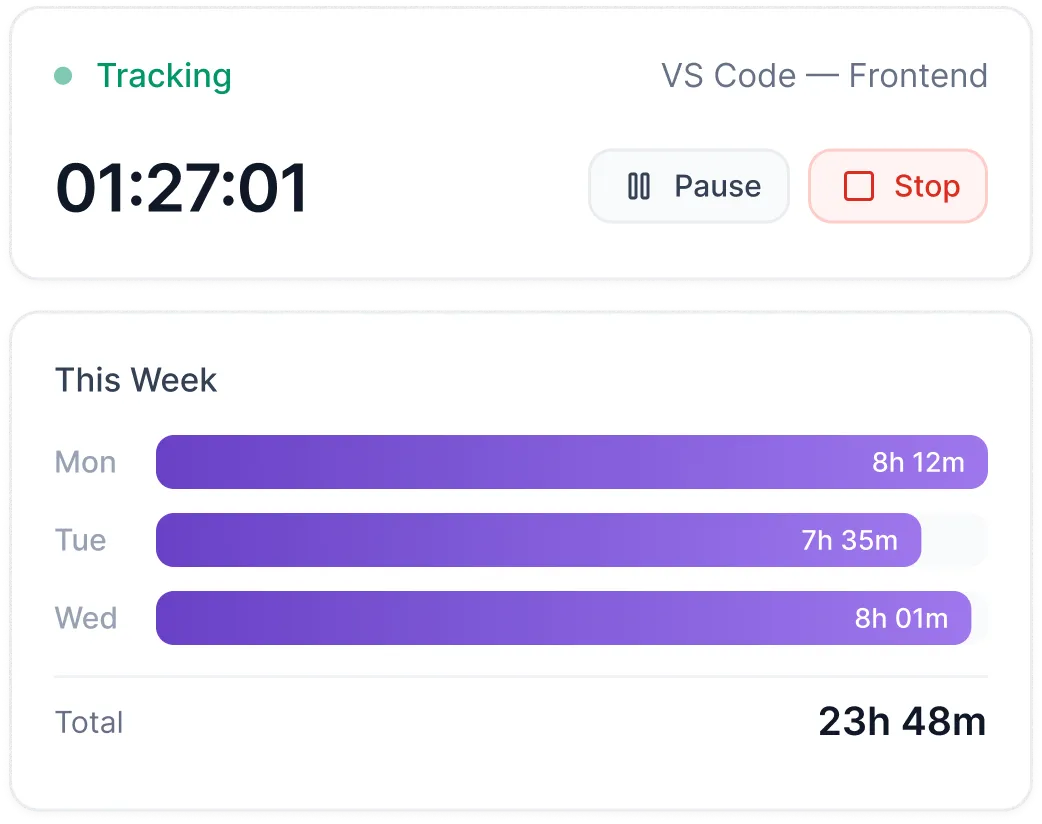
Sessions start when work starts. Modge records start time, end time, project, and which apps were active during the session. Idle time is detected and excluded automatically.
Time tracking interface showing 1 hour 27 minutes tracked on VS Code Frontend, with buttons to pause or stop; weekly summary bars display 8h12m on Monday, 7h35m on Tuesday, 8h01m on Wednesday, totaling 23h48m.
3

Review and approve

Tracked sessions land in a weekly or biweekly timesheet. Employees submit; managers approve a whole pay period in one click; denied entries kick back with a comment for the employee to fix.
    Open
    2
    timesheets
      Submitted
      3
      timesheets
        Approved
        5
        timesheets
        • Adrian Chester S.
          Submitted
        • Mar 16 – Apr 15
          61:51:37
        • ApproveDeny
        image
        THE DESKTOP AGENT

        Install once. Time tracks itself.

        The lightweight agent does the watching. Your team does the work.

        macOS and Windows, installs in about two minutes per machine

        Captures sessions, projects, and apps without manual timers

        Idle detection so tracked time reflects actual work, not abandoned sessions

        Offline support - sessions sync when the network comes back

        OPTIONAL SCREENSHOTS

        Visual proof of work, on your terms.

         Screenshots are completely optional. On per team or per person, off everywhere else, blurred when policy demands it.

        Off by default - opt in per team or per individual

        Capture interval set to match your policy

        Blur toggled at the organization level or per individual

        Screenshots tied to the matching tracked session for verification

        image
        image
        APP & URL TRACKING

        See which tools your team actually uses.

        Every app and website is captured during a session, then classified as productive, neutral, or unproductive - using rules you control.

        Per-session app and URL capture

        Productivity classification with org-wide and per-job-title overrides

        Per-app time totals at the person, team, and project level

        Drill into any app to see who used it, when, and on what

        CONNECTED WORKFLOW

        From tracked sessions to timesheets & attendance.

        One desktop agent powers four workflows. The data only gets entered once.

        For team leads and managers

        Tracked sessions become timesheets your team submits and you approve. The same sessions feed shift adherence, profitability reports, and payroll exports - all on one source of truth.
        list-icon
        One-click pay-period approval
        list-icon
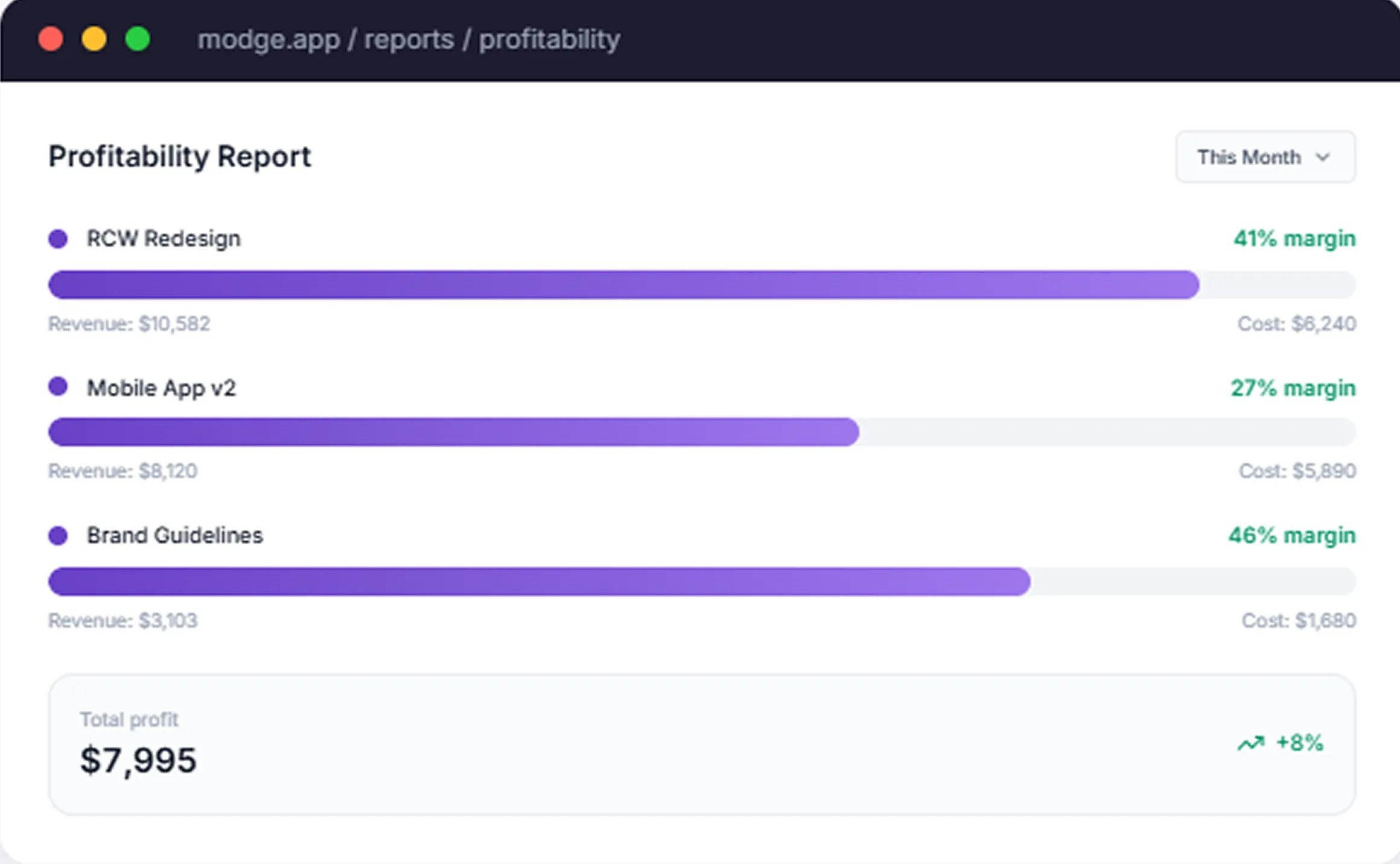
        Profitability per project, per client, per person
        list-icon
        Activity timeline for the day, the week, or the month

        For shift-based teams

        Build the schedule once. Modge compares tracked sessions against scheduled shifts to compute adherence - on time, late, or absent - based on grace windows you control.
        list-icon
        Weekly, biweekly, and one-time shift patterns
        list-icon
        Adherence scored shift by shift, person by person
        list-icon
        Late arrival and missed-shift notifications
        Reports

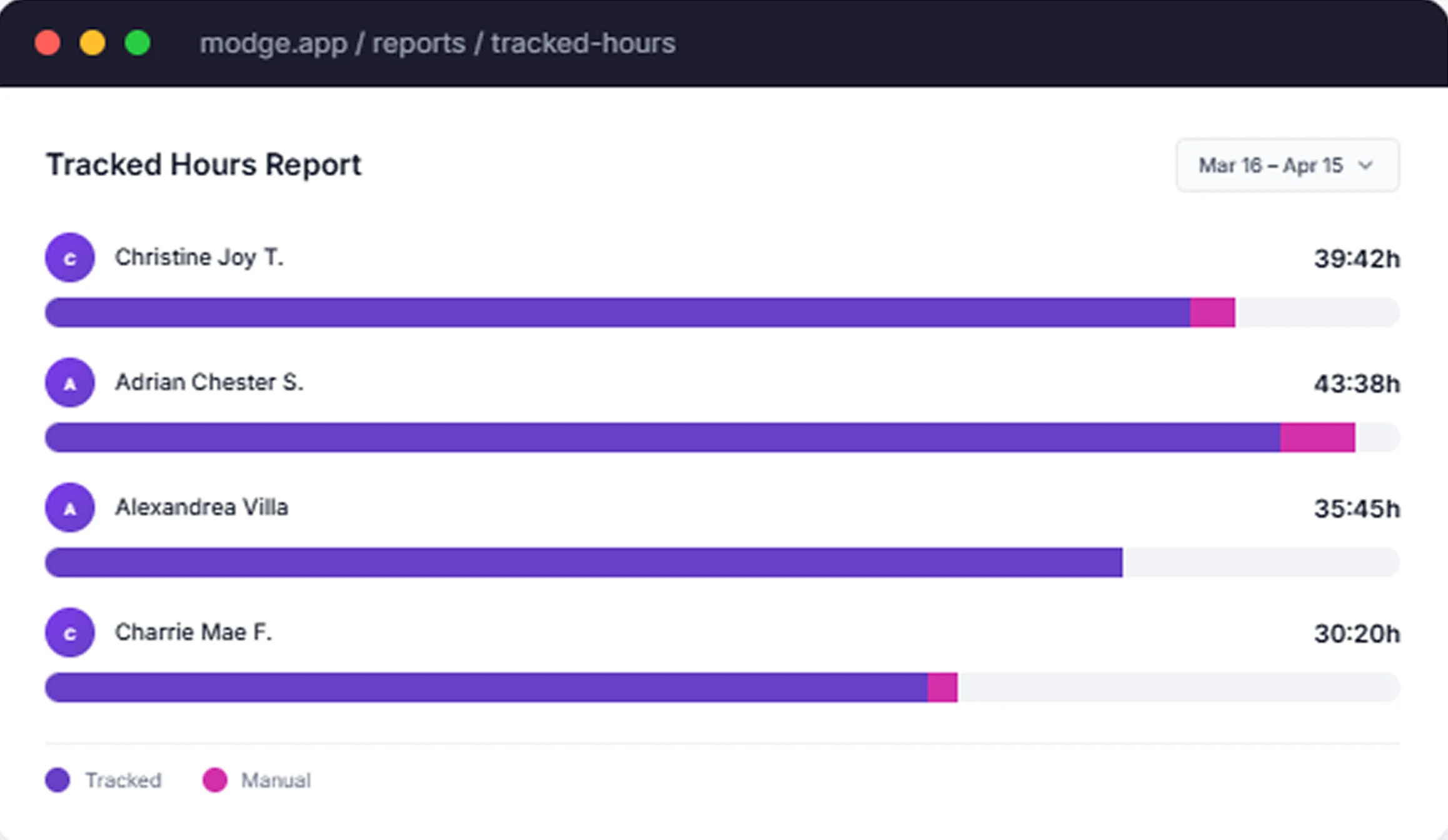
        The three reports time-tracking actually exists for.

         Tracked Hours, Profitability, and Manual Time Audit. Built-in. No spreadsheets to glue together.
        Our Core Features

        Everything time-tracking needs to do in one place.

        icon-1
        Automatic & Manual Tracking
        Sessions captured automatically by the desktop agent. Add manual entries by hand when you forget - every manual edit is audited.
        icon-2
        App & URL Tracking
        Every app and website used during a session, classified as productive, neutral, or unproductive.
        icon-3
        Idle Detection
        Sessions that go quiet for more than your configured threshold are flagged as idle and excluded from billable time.
        icon-4
        Timesheet Approvals
        Pay periods approved in one click. Denied entries kick back with a comment.
        icon-5
        Project & Billable Tracking
        Tag every session with a project and a billable flag. Roll up by project, by client, or by person.
        icon-6
        Budgets & Alerts
        Set hour or cost budgets per project. Get notified before you blow through one.
        icon-7
        Offline Sync
        Continue working without internet. Sessions sync the moment the network comes back.
        icon-8
        Manual Time Entries
        Add or edit time by hand. Every change is logged with who, when, what changed, and the reason.
        icon-9
        Payroll Exports
        CSV in three formats (generic, Wise, PayPal). Or printable PDF. Pay periods reconcile against approved hours and paid leave.
        BUILT FOR PERFORMANCE TEAMS

        One time tracker. Five very different teams.

        Frame 2147237561
        Remote & hybrid teams
        Real visibility across time zones without status-update theater.
        Frame 2147237562
        Agencies & BPOs
        Profit-per-retainer reports, billable proof for clients, and per-team policies for in-house and offshore.
        Frame 2147237563
        Tech & SaaS
        Track engineering effort by project without instrumenting your team to death.
        Frame 2147237564
        Operations & HR
        Tracked hours flow into attendance, leave, and payroll on one source of truth.
        Frame 2147237565
        Enterprise
        Multi-team, multi-manager, role-scoped from the database up.
        IMPACT

        What changes after teams switch to Modge.

        5h+

        manager time saved per week on timesheet chasing

        2x

        Faster pay-period approval cycles

        23%

        More focus time in the first 30 days

        100%

        Pay periods approved on schedule

        SECURITY

        Privacy & Security You Can Trust

        Modge is built on enterprise-grade security and certified to ISO 27001, HIPAA, PCI DSS, and SOC 2 Type II. The list below is the product specification, not just a privacy promise.

        icon

        What we never do

        icon

        Log a single keystroke or what you typed

        icon

        Track mouse movements, locations, or pointer paths

        icon

        Capture activity outside an active work session

        icon

        Sell, share, or train AI on your team's data

        icon

        How we protect data

        icon

        End-to-end AES-256 encryption at rest, TLS 1.3 in transit

        icon

        Row-level security in Postgres so people see only what their role allows

        icon

        Screenshots are off by default, opt-in per team or per person, with configurable blur

        icon

        Hosted on SOC 2 Type II compliant infrastructure

        icon

        Annual penetration testing and third-party security audits

        image

        ISO 27001 Certified

        image

        HIPAA Certified

        image

        PCI DSS Compliant

        image

        SOC 2 Type II Certified

        FAQ

        Eleven things teams ask before they roll Modge out.

        How does Modge actually track time?

        The desktop agent records a session whenever your team is working - start time, end time, the project, and which apps and websites were active during the session. There is no timer to start and no clock-in screen to forget.

        What operating systems does the agent support?

        macOS and Windows. The same agent, the same configuration, on both. Linux and mobile are on the roadmap.

        Does Modge work offline?

        Yes. The agent continues capturing time and activity when offline. Sessions sync the moment the network comes back - no data loss, no missed entries.

        Can my team add time manually?

        Yes. Manual entries are supported and tracked separately from automatic sessions. Every manual change is logged with who edited it, when, what changed, and the reason. The audit log is immutable.

        How do timesheet approvals work?

        Tracked sessions roll into a weekly or biweekly timesheet that the employee submits at the end of the pay period. Managers approve the whole period in one click, deny individual entries with a comment, and the period locks once everything is signed off.

        Can I track billable vs non-billable hours?

        Yes. Each session is tagged with a project and a billable flag. Reports filter on either. Bill rates can be set per member, per project, or per client.

        How does Modge handle idle time?

        When a session goes quiet for longer than your configured idle threshold, the time is flagged as idle and excluded from billable totals. The threshold is configurable per organization.

        Are screenshots required?

        No. Screenshots are completely optional and off by default. You can enable them per team or per individual, set the capture interval to match your policy, and toggle blur at the organization level or per person.

        What payroll exports does Modge support?

        CSV in three formats - generic, Wise, and PayPal - plus a printable PDF. Pay periods reconcile against approved hours, paid leave, and the bill rate rules you've set per member or project.

        How does Modge handle multiple time zones?

        Each user's timezone is stored on their profile. Sessions, shifts, attendance, and pay periods all normalize to the right zone automatically. Reports can be viewed in the team's, the manager's, or the user's timezone.

        How quickly can a team go live?

        Most teams are live the same day. Install the agent (about two minutes per machine), invite your team, and the first sessions show up in the dashboard immediately. The 14-day free trial includes the full feature set.

        Install the agent. Everything else is automatic.

        Free for 14 days, full access, no credit card. Two-minute install on macOS or Windows. Most teams have their first approved pay period inside the first week.

        image