Modge shift scheduling lives on the same data as attendance, adherence, leave, and payroll. Build the schedule once - and the on-time rate, the late arrivals, the missed shifts, and the pay-period totals all calculate themselves.
Free 14-day trial
Cancel anytime
Built-in attendance and adherence
.webp)
.webp)
.webp)
.webp)

.webp)
A timeline of every shift today, with the assigned person on each row and live status overlaid. See who started on time, who hasn't clocked in yet, and who's running long, in one scroll.
.webp)
A calendar grid showing every assigned shift across the week. Drag to move shifts. Duplicate templates for recurring rotations. Edit only the exceptions.
.webp)
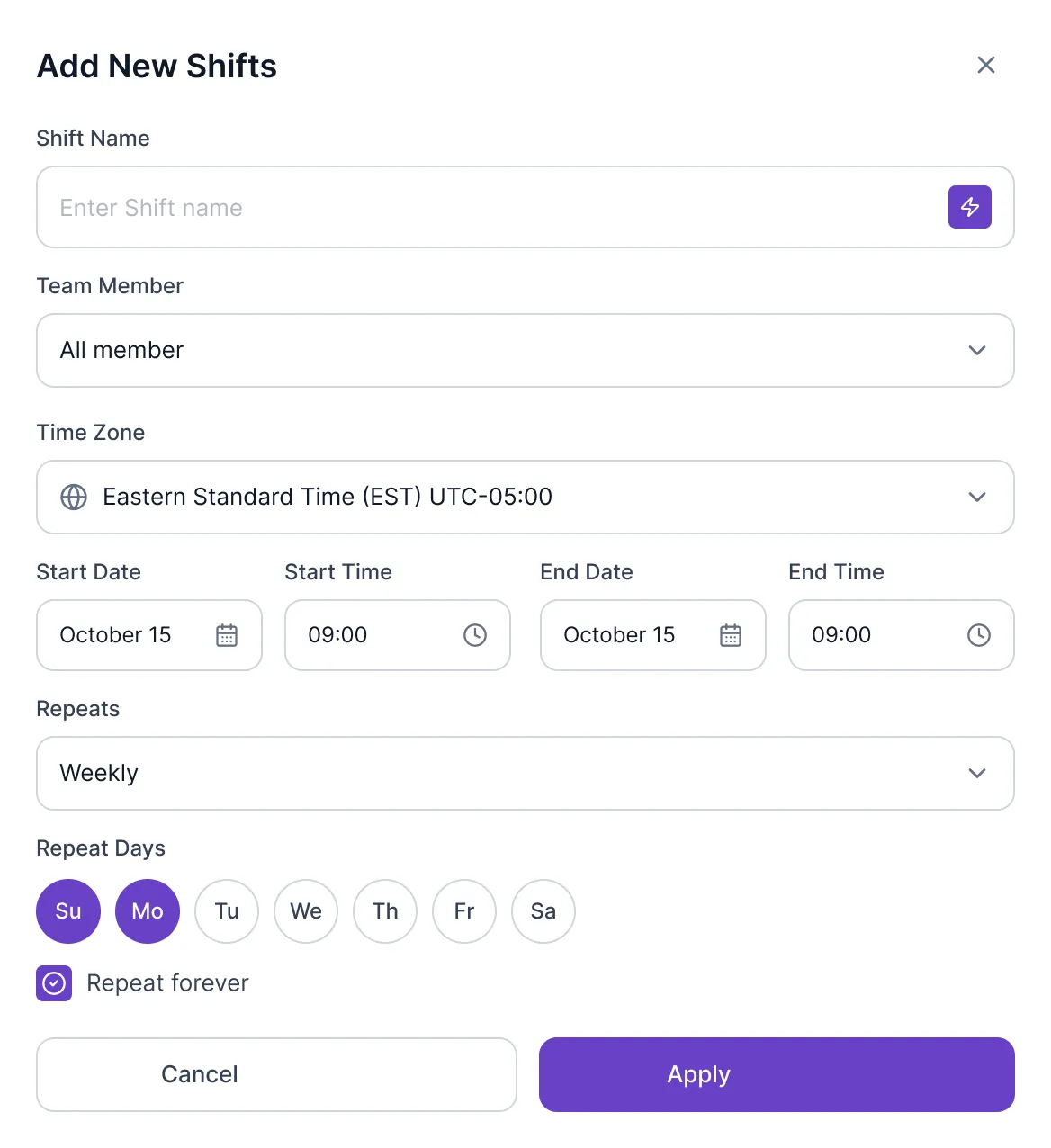
The shift management screen - create one-off, weekly, or biweekly shift patterns. Assign to a single person or a whole team. Set per-person grace windows and overtime rules.
Once you assign a shift, Modge knows who's expected to be working when. The desktop agent records when each person actually started - and Modge compares the two in real time. On time, late, or absent. The score updates as the day happens, not at the end of the week.
Adherence rolls up by person, team, or department. The same data covers the timesheet, the payroll export, and the late-arrival notification that hits your inbox at 9:07 AM.
.webp)

Create shifts with precise time zones, repeating patterns, and team assignments. Set it once and Modge handles the rest — weekly, daily, or custom rotations.
One click to start, one click to stop. The agent runs in the background and logs every app, URL, and session without anyone having to remember.
Find the tools your team actually relies on, ranked by hours and grouped by productivity classification, before usage patterns show up in delivery delays.
Long pauses for thinking shouldn't kill a productivity score. Configurable idle thresholds tell deep focus from real inactivity, so the totals stay honest.
Daily and weekly views, in-line edits, and one-click approvals. Friday afternoons get an hour of their life back.
Custom leave policies, PTO accrual, and approval flows that land straight in the right timesheet. No spreadsheet handoff at the end of the month.
Set per-project budgets and bill rates, then watch project profitability update as the team logs time, so overruns get spotted before the invoice goes out.
Network blips don't drop work. Events buffer locally on the device and sync the moment the agent reconnects.
Owner, admin, manager, employee, viewer. Each role sees only the projects, teams, and data their job actually needs.
Export CSV or PDF for any date range, person, team, or project. Hand finance and clients clean reports without anyone touching a spreadsheet.
On-time rate, average across customers
Manager time saved per week on rebuilding the schedule
Faster shift-swap approval
Fewer "who's working today?" Slack messages
Yes. Build weekly, biweekly, or one-time patterns. Save them as templates and reuse them across teams. Edit the exceptions instead of rebuilding from scratch.
The desktop agent records the actual session. Modge compares the session against the scheduled shift in real time and assigns on-time, late, or absent based on grace windows you set per organization or per user.
Modge primarily uses the desktop agent for time capture, which works on any macOS or Windows machine. We don't directly integrate with biometric or punch-clock hardware today, but you can record entries manually from the dashboard for teams that use external clocks.
Shift-swap requests are on the roadmap. Today, supervisors and HR partners can reassign shifts directly from the dashboard, and the change syncs to attendance and timesheet automatically.
Yes. Scheduled hours, actual hours, overtime, and adherence scores all export to CSV or PDF. Pay-period exports include CSV variants for generic, Wise, and PayPal payroll formats.
Yes. Late-arrival and missed-shift notifications fire automatically once the grace window is exceeded. Notifications can be sent in-app, by email, or both, and routed to the right manager based on team assignments.
Sessions that exceed the scheduled shift length are flagged as overtime in real time. Overtime hours are visible in the report before they hit payroll, so you can approve overtime on purpose instead of discovering it on Friday.
Free for 14 days. Full feature access. Two-minute install on macOS or Windows. Schedule, attendance, and adherence on one dashboard.