The Smarter Way to Track Attendance & Adherence

Modge compares tracked sessions against scheduled shifts in real time and assigns on-time, late, or absent automatically - based on grace windows you control. The adherence score updates as the day happens. The reports your reviews and audits actually need are already built.

vector

Free 14-day trial

vector

No credit card required

vector

Real-time on-time / late / absent scoring
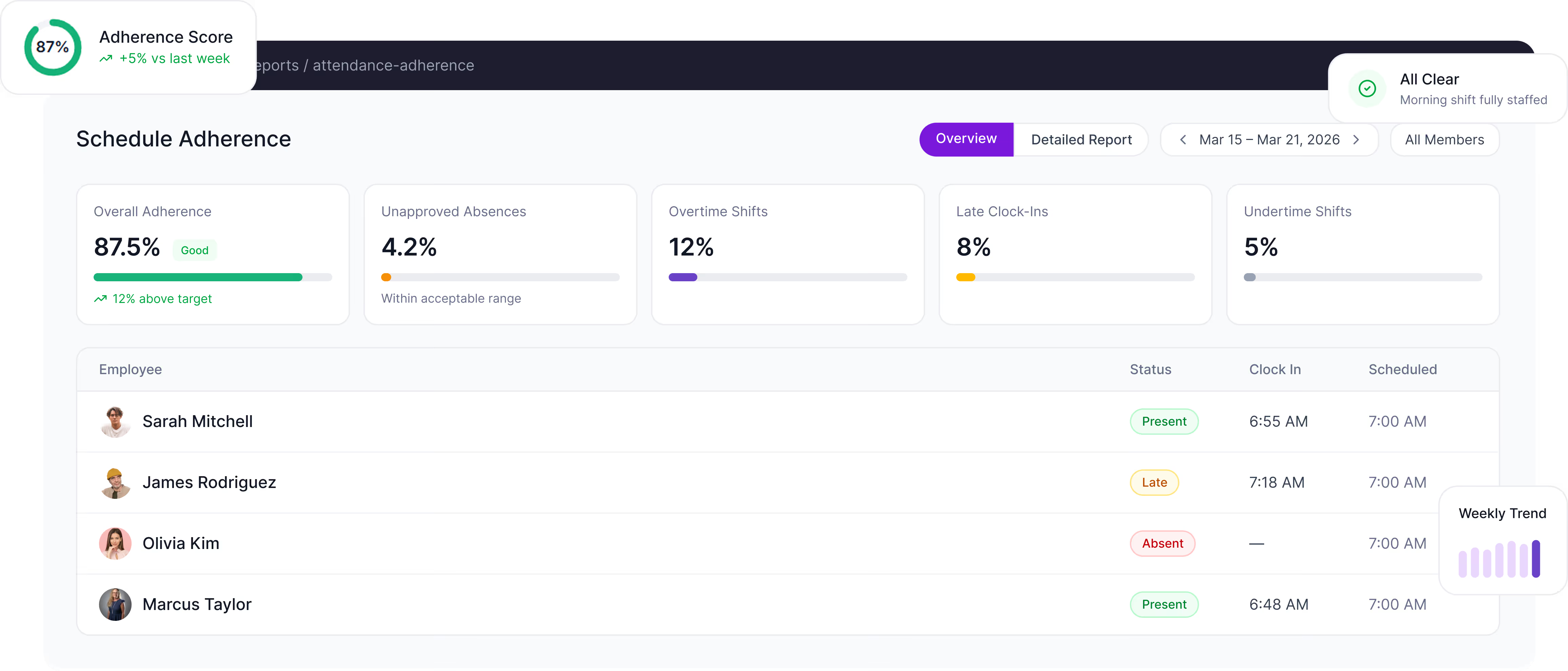
Schedule adherence report showing overall adherence at 87.5% with 12% above target, unapproved absences at 4.2%, overtime shifts 12%, late clock-ins 8%, undertime shifts 5%, and employee statuses with clock-in and scheduled times.Green checkmark icon with text reading 'All Clear' and 'Morning shift fully staffed'.Bar chart showing a weekly trend with bars increasing in height from left to right.Adherence Score indicator showing 87% with a positive change of 5% compared to last week.
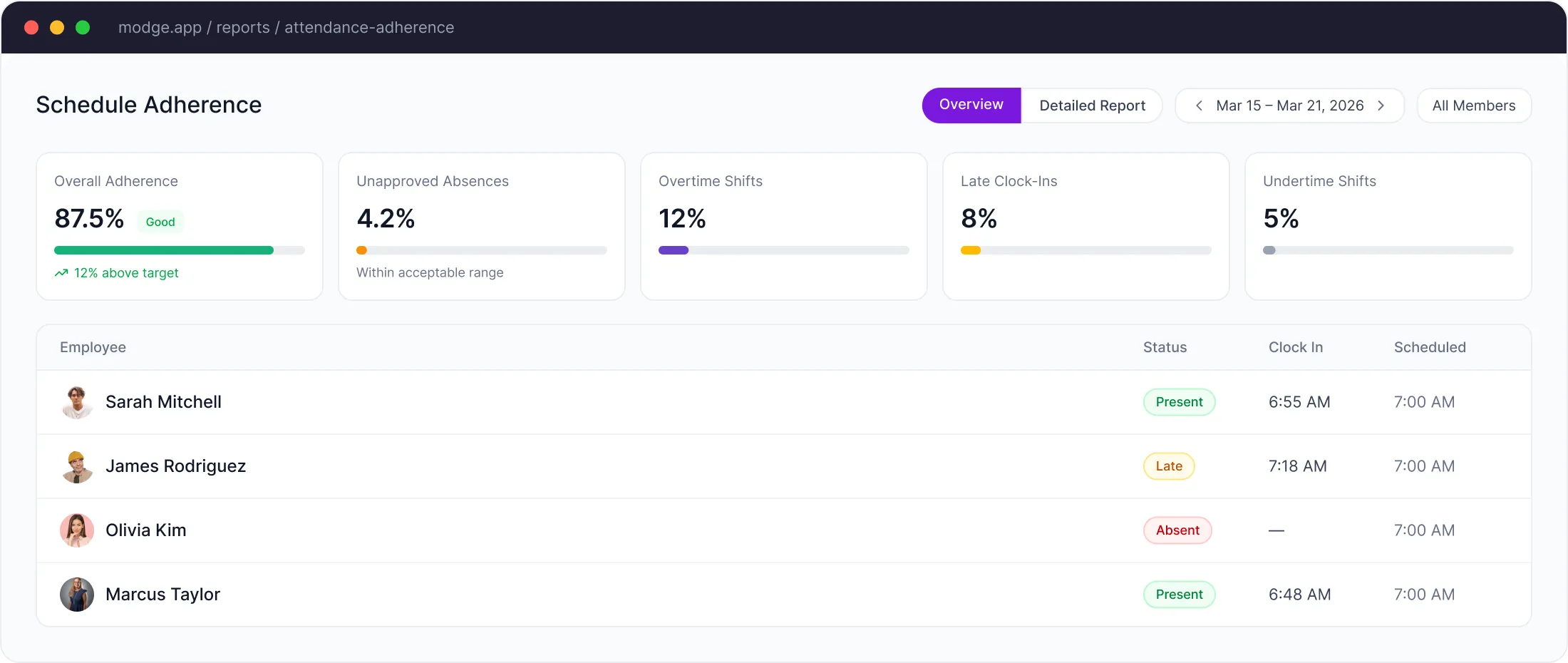
Dashboard showing schedule adherence with overall adherence at 87.5%, unapproved absences 4.2%, overtime shifts 12%, late clock-ins 8%, and undertime shifts 5%, along with employee statuses.
Five professional individuals standing and smiling in circular frames, representing diverse business team members.
Trusted by 1,800+ remote & on-site teams
0
Hours Tracked
0
Shifts Monitored
0
Employees Managed
0%
Uptime
image
WHAT IT IS

Your attendance hub - built for action, not just record-keeping.

Modge attendance and adherence runs on the same data as your shift schedule and your time tracking. Once a shift is assigned, Modge knows who's expected to be working when. Once the desktop agent records the session, Modge knows who actually showed up. The two get compared in real time - and the score updates as the day happens.

That score becomes the input for the conversation that matters: who needs more support, where the schedule itself isn't working, and where the team is performing better than the report would have caught a week later.

Start Free Trial
HOW IT WORKS

Three steps. Then attendance runs itself.

Work shift calendar for team members Jenny Wilson, Eleanor Pena, and Kristin Watson showing shifts from August 12 to 17, 2025, with shift times, status, and a seasoned holiday on August 17.
DETAILED REPORTS

Drill into every employee, every shift.

The Detailed Report shows exactly what happened — who clocked in, when, and their adherence status.

list-icon
Per-employee adherence score for any date range
list-icon
On-time, late, and absent counts with the underlying session detail
list-icon
Shift-vs-actual comparison for any day, week, or month
list-icon
Exportable to CSV or PDF for HR reviews and compliance audits
See It in Action
image
LIVE DASHBOARD

The widgets your morning standup needs.

Real-time widgets that give your team instant clarity on attendance and adherence.
Overall adherence
One number that tells you how the team is performing this week vs last. Sample value: 87%, with the trend delta vs the prior week.

Overall Adherence

This week
87%
On Time 74%
Late 8%
Absent 5%
Overtime 13%
Today's status
One number that tells you how the team is performing this week vs last. Sample value: 87%, with the trend delta vs the prior week.

Today's Status

Live
Sarah M. Sarah M. Present 6:55 AM
James R. James R. Late 7:18 AM
Olivia K. Olivia K. Absent
Marcus T. Marcus T. Present 6:48 AM
Priya N. Priya N. Overtime +2h
Weekly trend
Adherence score sparkline week over week, with the delta vs the previous period. Good for spotting drift before it becomes a quarterly problem. Sample delta: +12%.

Weekly Trend

+12%
Mon
82%
Tue
78%
Wed
85%
Thu
90%
Fri
87%
CORE FEATURES

Everything attendance and adherence should do.

Adherence scoring

Every shift gets an adherence percentage based on actual time worked vs scheduled time. Aggregate by person, team, or department.

Real-Time Alerts

Late-arrival and missed-shift notifications fire the moment the grace window is exceeded. In-app, by email, or both.

Shift vs actual comparison

Each scheduled shift is matched against the actual recorded session. The variance shows up immediately, not at the end of the pay period.

Compliance-ready exports

Attendance and adherence reports export to CSV or PDF for HR reviews, compliance audits, and labor-law documentation.

Configurable grace periods

Set arrival and departure grace windows per organization or per user. The "five-minute rule" is configurable.

Custom reports

Filter adherence reports by team, date range, or shift type. Save filter presets for the reports you run weekly.
BUILT FOR EVERY ROLE

Tailored attendance dashboards for every role.

From shift managers to C-suite, everyone gets the view they need.

Shift managers

Live clock-in feed of who's started, who's running late, and who hasn't shown up yet. Reassign shifts, contact the missing person, and update the schedule from one screen.
list-icon
Live clock-in feed
list-icon
Instant late-arrival alerts
list-icon
Fast shift reassignment

HR & operations

Adherence reports across teams. Late-arrival patterns by individual. Audit-ready attendance documentation for reviews and compliance.
list-icon
Per-person adherence trends
list-icon
Late-arrival pattern reports
list-icon
Audit-ready documentation

Executives

One adherence number per team. The trend that tells you whether the operation is tightening or drifting. Drill into the underlying detail when the answer matters.
list-icon
One number per team
list-icon
Tightening vs drifting trends
list-icon
Drill-down on demand
IMPACT

What changes once attendance and adherence  live in the same dashboard.

+87%

Attendance accuracy vs manual roll-call

+52%

Improvement in punctuality after the first 30 days

+61%

Faster reporting on adherence reviews

+74%

More complete documentation for policy compliance

+47%

Manager time saved on attendance chasing

+56%

Reduction in unapproved overtime
FAQ

The Ultimate Guide to Attendance & Adherence.

How does Modge compute attendance?

The desktop agent records the actual session. Modge compares the session against the scheduled shift in real time and assigns on-time, late, or absent based on grace windows you set per organization or per user.

What is "adherence" exactly?

Adherence is the percentage of the scheduled shift that the team member actually worked. A 10 AM-to-6 PM shift worked from 10:05 to 5:55, with a one-hour break, would score against the configured threshold for both arrival/departure grace and break compliance. Aggregate scores roll up by person, team, or department.

Does Modge alert managers about late arrivals or missed shifts?

Yes. Late-arrival and missed-shift notifications fire automatically once the grace window is exceeded. Notifications can be sent in-app, by email, or both, and routed to the right manager based on team assignments.

Can I configure different grace periods per team?

Yes. Grace windows for arrival, departure, and break compliance can be configured per organization, per team, or per individual.

Does Modge work across multiple time zones?

Yes. Each user's timezone is stored on their profile. Shifts, sessions, and adherence scores all normalize automatically. Reports can be viewed in the team's, the manager's, or the user's local zone.

Can I export attendance data for compliance reviews?

Yes. Attendance and adherence reports export to CSV or PDF for any date range. The export includes the scheduled shift, the actual session, the variance, and the assigned status - the columns most auditors and HR reviews ask for.

What happens if someone forgets to start the desktop agent?

The shift will show as not started until the agent records a session. If the team member adds a manual entry to cover the missed time, the entry is logged in the audit trail with the editor's name, the timestamp, and the reason given.

See attendance clearly. Manage adherence intelligently.

See attendance clearly. Manage adherence intelligently.

image